Showing posts with label game. Show all posts

2014-06-21

Book: The Inner Game

The actual title of the book that I just read is called "The Inner Game of Tennis", but this post is not about tennis.

This was a great read, and you should read this book if you play sports and have ever wondered why you play good one day and bad the next. This book may help you have a more consistent and higher gameplay.

I wrote a whole bunch of notes as I read, and you can read them on GitHub.

If it's too much trouble to click a link, then here's the TLDR (Too Long; Didn't Read) that shares just a few of the biggest points:

  • There is an inner game and outer game. There are already many great resources on the outer game.
  • During practice, analyze your movements (methods includes "feeling" it, mirrors, video playback) and don't try to force any change. During game play, just let it happen naturally; trust yourself.
  • Experiment with many different playing styles. The "right" style may be different for different people.
  • You still may need some good outer game practice in order to gain more from these inner game tips.
  • If you dislike competition, then you have the wrong idea about it.
  • When playing, if you have any anxieties or frustrations, then you aren't a player of the inner game.


And, if you have already read this book or any of the other "Inner Game" books, then I'd be happy to hear your biggest take-aways.

~ Danial Goodwin ~


2014-03-06

Published Two New Apps: Flappy Gravity and Gravity Runner

Using Construct 2, I've created two new HTML5 apps which run natively in Windows 8 and Windows Phone. I'd like to encourage you to try the apps. The links go to the store where you can see screenshots of the apps.

Gravity Runner
Gravity has gone crazy. There's only one hope... But, beware, the more times you change gravity, the more your power goes down.
- You are in control of gravity!
- Infinite, randomized levels
- Touch-enabled

Available now:
- Windows 8
- Windows Phone


Flappy Gravity
Gravity gone wrong! Change gravity with every tap! Avoid the obstacles.

2014-02-22

Published New App: Wall Ball

I just created a new game using a concept that I haven't seen in any other game. It's almost like a single player pong game with different objectives.

Using the Construct 2 game engine, so that I only have to create the code base once, I've made the game available for Windows 8 and Windows Phone.

Try it out now:
- On Windows 8
- On Windows Phone


~ Danial Goodwin ~


2014-02-18

Published New App: One-Click Saga

Today (and yesterday), I created this "One-Click Saga" game using the Construct 2 game engine. C2 definitely allows great games to be created with ease.

Description:
Three games to master. Flappy's too tired to flap anymore, so he is taking a ride on different airborne vehicles. Rules are the same: tap to save the clone bird's life! But, in each game a tap does something different...

Available Now:
- Windows 8
- Windows Phone
- HTML5


~ Danial Goodwin ~


2014-02-16

Level Up - Creativity: Revamp Old Ideas

A thought just occurred to me, how am I going to describe the next game I create?

One requirement would have to be that the description entices visitors to download the game and try it..

So, I could try to be original, which I usually do try to do.. Or, a new strategy occurred to me: be original within the bounds of what people already know about.

Here's a few descriptions for new games off the top of my head:
- Bomberman, without the bombs.
- Flappy Bird, but you're a fish, and underwater, avoiding nasty underwater cactus.
- Flappy Bird + Bomberman = Try to blow up pixel birds.
- Pong, but one player and no computer opponent.
- Side-scrolling shooter


Maybe these aren't the most creative ideas, but they can work. For more creativity, assumption reversal usually works better. Post coming soon. ;)
~ Danial Goodwin ~


2014-01-14

Level Up: Paint.NET: Create Large Image From Small Image Source

In trying to create a logo for my newest game, I had a few images that were 32x32 pixels. So, my first thought for the logo was just a mash up with all of them. And, that looked something horrific, like:

A mashup of small pixelated icons
And, if that were scaled up to the size I needed, it would be even more pixelated, which I did not want for this game. So, I thought for a few seconds to determine what I were to do if I weren't lazy. Using my design background and my like for being minimal, I've decided to just create an image of my own that wouldn't be pixelated. If I were to just blow up an 32x32 image to 1000x1000, here's what it would look like:

This is worse than pixelation
Solution, in order to capture the essence of the game in just a single simple icon, I determined that the bomb disguised as a coin would best represent most of the game. Hopefully, it would also provide a little bit of intrigue to get users to click on it.

Final image, using only my own circles, lines, and rounded rectangles. Oh, and the practical use of Gaussian Blur for the level up! =]


Btw, you can play the free beta version at Simply Advanced Games. Coinqueror is coming soon for Windows 8 and Windows Phone 8.

~ Danial Goodwin ~


2014-01-13

Level Up: Nerdiness: Mod Japanese Super Famicom Games to Play in US Super Nintendo Consoles

Thus, my Nerd level has once again increased after today's completion of modding my Super Nintendo Entertainment System (SNES) so that I can play my ~20 Famicom games on there.

Thanks to MakeUseOf for pointing me in the right direction.

I learned that there was no software restricting the pay of the Japanese games on the American consoles. There was just two small pieces of plastic restricting the cartridge from sitting properly inside. American cartridges have two grooves on the back and the Japanese cartridges are flat.

It seems a lot easier to cut the plastic restrictions off inside the console, compared to creating indentations on each of the games.

The website used only a wire cutter to remove the excess plastic that was in the way, inside the SNES. After discovering that the closest pair of wire cutters next to me were too big, I reach for the next closest thing, which just happened to be a saw.

The oscillating/vibrating saw worked perfectly. It was made to cut flush against surfaces, and that's exactly what happened.

One other note. Japanese cartridges are a little less narrow than the US counterparts, so you have to be a little more careful when inserting them. But, it shouldn't be difficult.

Have fun!

~ Danial Goodwin ~


2013-12-14

Construct 2: Exporting to Windows Phone

Windows Phone app certification requires games to have "Back" button functionality. E.g. Main menu should exit app and other pages should either go back within the game for navigation or bring up a pause popup.

So, using the plugin + strategy mentioned here, I was able to bring the Windows Phone app up to standards for publishing. There is a great function/event/action that can be called to intercept the back button presses so that the developer can do whatever.

Also, I didn't use the entire strategy mentioned at the above link, but that's the method I would recommend others to take. I took the harder method just for learning how the plugin worked and involves moving a lot of code around manually and breaks some of the functionalities in the plugin so that only `Back` works. But, eventually, I think I will share the specifics for learning about the C2 plugins.

~ Danial Goodwin ~


2013-12-12

Creating Windows Apps With Construct 2

Intro:
I plan on creating 100 games with Construct 2. I'll be writing about all/most of my experiences of using the program. Originally, I was thinking about creating a separate blog for just this endeavor, but I already have too many blog concurrently. So, posts in this blog with be tagged "construct 2" and "c2" when they are related to this.

Goals for each game:
 - I must learn something for every game I create.
 - I must feel reasonably good about them. Though, they also may not be my best work.
 - These games should be publishable.
 - At first, the games will only be published to the Windows 8 Store and Windows Phone Store.

Why only Windows?
Mainly because it's currently the best platform to publish to. The Windows platforms may not have the largest market share, but they still do have millions upon millions of users. Soon, just about ever computer will be running Windows 8, and they will need apps to download, my apps. ;)

After goals:
After accumulating all the knowledge that comes from creating 100 different games. I mostly likely will update the most popular ones with more levels/features. Then, we'll see. =]

~ Danial Goodwin ~


2013-11-09

Danial Versus Games

Whenever I get the sudden thought to play a game, I think how much more satisfying it will be to just create a game instead. Or at least create another app.

--
Random story that I remember:

I first got into computer programming in high school by editing the source code of a popular MMORPG (Runescape) in order to make it better. The language was Java, but at that time I just knew it as code. And, with no prior coding experience I could understand and walk through much of source code without looking up what different words meant. I just thought that was cool, it felt great how everything just clicked together. But, it actually wasn't until a few years later as a sophomore in college that I actually decided to get into computer engineering and take my first real logic and programming class (basically, the school said I choose a specific degree to work towards. I just wanted to learn everything).
--

Coding has the elements that playing games offer:

  • There are highs and lows
  • There are easy parts and hard parts
  • You can save and resume at any time. Or even start over

And coding has even more great elements only available in some games:

  • Levels are always evolving
  • They can be single player/coder or multiplayer/coder
  • As you work on more parts, you "level up"
  • Instead of spending money, you make money ;)


~ Simply Advanced ~

ps - I like how originally this was just going to be a 1-2 sentence post.. ;]


2013-03-23

How To Publish a Windows 8 App Using GameMaker: Studio

This post is going to be one of my longer ones, but no worries. It still contains only the minimum amount of work needed to get done before you have the ability to publish. Here's the official YoYo Games' GameMaker Setup walkthrough. http://help.yoyogames.com/entries/22361996-Setup-GameMaker-Studio-for-Windows-8

It has some good stuff, but not good enough. You'll be back here in order to successfully publish the Windows 8 app.


So, in this walkthrough, I will show you how to properly create the Windows 8 application for upload, using GameMaker: Studio.

I'll assume you already have:


1. First of all, make sure you have the proper GameMaker program. There are mainly two different ones to choose from. Choose one from http://www.yoyogames.com/gamemaker/studio and you must pay at least the $49.99 in order to publish to Windows 8. You must also have Microsoft Visual Studios 2012 installed.

2. The second biggest problem is not choosing the right target platform. Currently, you must choose "Windows 8 (Javascript)" option from the Target menu near the top (see pic below). Note: If you are using GameMaker in Windows 8, then choosing this method is the only way to save the project too. Having a target of regular Windows causes an error.
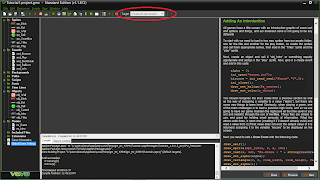
Platform target menu circled in red


3. Third, from the menu up top, choose File->Preferences->Windows 8. You should see something that looks like the following screen.

All this was setup for me automatically because I have created a Windows 8 app before. If these fields are not inputted, then please read http://help.yoyogames.com/entries/22361996-Setup-GameMaker-Studio-for-Windows-8. I can't describe the Preferences screen better than that (towards the bottom of the link).

4. Now that the GameMaker Preferences are set up, it is time to setup you project's Global Game Settings.
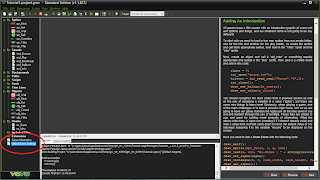
Double-click to open the Global Game Settings

This is where all other GameMaker to Windows 8 tutorials get messed up. What you need to do is open up Visual Studios 2012 and create a new basic Javascript project. It doesn't matter what you name it (for this tutorial let's call it GameMakerTest). Now, you need to reserve your app name (to ensure that it is available), associate the app with the store to get the package name, and create an app package to get the needed certificate. Where to find these options depends on if you have Visual Studios Express or Full.

4.1. To reserve your app name:

Express: In the menu bar up top: Store->Reserve App Name
Full: In the menu bar up top: Project->Store->Reserve App Name

(A new tab in your browser will open, titled "Submit an app")

Click on "App Name", which should be highlighted in blue in the middle of the screen. Then name your app. Your first choice may be taken already, so choose again. Remember this name because you will use it later back in GameMaker. Don't close this screen because you will use it again after inputting the details into GameMaker.

4.2. To associate app with the Windows Store and get the package name.

Express: In the menu bar up top: Store->Associate app with store
Full: In the menu bar up top: Project->Store->Associate app with store

Sign in with your Microsoft account. Navigate the screens and choose the one that app name that you just reserved for your GameMaker game. (Tip: The last screen shows some helpful information, like your publisher display name, if you don't remember it. You'll need to type that into GameMaker in step 5.)


4.3. To compile app and get a Windows 8 app certificate (to be used later in GameMaker):
Express: In the menu bar up top: Store->Create App Packages
Full: In the menu bar up top: Project->Store->Create App Packages

Sign in with your Microsoft account. You should see the app name that you just resevered, if not, then check the only checkbox that is there. You will need to know both the App Name and Package Identity in the Store. For this tutorial, I'm just going to say copy this information in your favorite text editor for now.
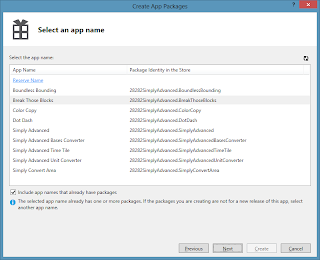
Your names and identities will be different than mine.
Highlight your app name that you want to submit. Click Next. Click Create. Click on the output location link so that the file explorer opens. Navigate one level up by clicking the up button. (You don't need to run the certification kit. It wouldn't work for you at this juncture anyways.)

The file you need here for GameMaker will be called _StoreKey.pfx (Ex: GameMakerTest_StoreKey.pfx). Keep this file explorer open so that you know where to find this file later in GameMaker.

5. Bring your project in GameMaker to the front again. You should still have Global Game Settings open on the Windows 8 tab. I will now walk you through what should go in each of the options.

Display Name - Put in the App Name that your reserved using Visual Studios
Package Name - Use the "Package Identity in the Store" value here. I told you to write this in your favorite text editor.
Package Display Name - Basically, the short name for your Display Name. It can be the same or a condensed version of it.
Publisher Display Name - What is your publisher display name when you created your Windows 8 Developer account? (It probably cost $49, or free if you are a student)
Version - Doesn't really matter. Just make sure it is higher than your last submission.

Each of the images that you see on this screen should be updated before publishing to Windows 8. So, go ahead and do that now. Don't close this screen yet. Come back here after you finish.

Currently, you should be in the General tab of the Windows8 tab in the Global Game Settings. On the left side, click the Installation tab. This is where you need to navigate to the PFX file (Ex: GameMakerTest_StoreKey.pfx). After you do that, click Install. Windows PowerShell will pop up and things will start to look very technical. Just read the options and continue moving forward. Close the Global Game Settings when you are done.

6. All the hard steps are finished. Now it's time to go to the menu bar, File->Create Application. Save it to your location of choice.

Navigate to the location you created the application. Click on the folder, then AppPackages. The *.appxupload is the file you will submit on the Windows website that you should still have open in your browser if you followed this walkthrough word for word.

UPDATE: After running through it again, I found out that you don't need to do step 4.3 if you do step 4.2. Associating the app with the store creates the certificate key. But, I'm leaving step 4.3 in just because it is easier to navigate to the file that way. Just know that next time you do this, you can remember where you save the project to and skip a step.


Please let me know if this walkthrough helped at all or if I should put in any more information. I spent about an hour creating this... after first learning how it do it myself which took much longer. =]

~ Simply Advanced ~


2012-12-30

Random Ideas and Thoughts - 20121230

[0] First thing, a little blurt about the number in the title. It is the date format that I'm using and liking very much to organize all of my folder and files. They are all automatically sorted in chronological order because of the name. One example, I used to label my school folders as "USF 2012 Spring" and "USF 2012 Fall" and "USF 2012 Summer." But, first of all it is not in an efficient order. And secondly, it doesn't look very neat. Within the past six months I've transitioned everything to the style of "USF201201", "", and "". It is more efficient, neater, and doesn't lose much readability if you can recognize the 2012 year in there.

..Remember, all of the following are fragmented thoughts, random, and does not have a reason... completely unlike what I try to accomplish above with the year-month-day format. =b

[1] A rollercoaster ride that feels like it is broken (and may fall at any moment). When there is a real problem with the ride (how would they know?), the ride tells the potential riders that workers must break the ride more before riders can ride again.

[2] Full theme park that is purposely seemingly empty. Some park goers are actors/hires (theme park goers would never know about this part). Couples may want to team up randomly in the park with others so that they are not totally alone, but that might just be their mistake.

[3] What birds are poisonous? [I was playing a quiz game and was the first to know that platypus was poisonous. The question was something like, "Which of the following is poisonous?" Egret was one of the answers, then this thought occurred]

[4] Are there fish ball/cages like there are hamster balls/cages? Maybe the fish can learn to travel by shifting their weight?

[5] "I cried because I had no shoes, until I saw a man with no feet." [A quote I saw in a book. A good thought provoker]

[6] Hobby: Making lists with only one item. ["Hobby:" - kind of like xkcd style]

[7] App for how long you have been away from Facebook and/or Gmail. [There should be a high scores list also (and the ability to share with friends?)]

[8] Dubstep without echo is kinda like classical music. And vise-versa.

[9] Write a book called, "Dan Writes a Book"

[10] Redit for Research Papers. Thumb up and thumb down. [I believe there are social medias revolving around research..]

[11] Proxy for Twitter API calls. Twitter limits the number of calls a day from an IP, but if you keep switching the IPs when they fail, then you have have a whole lot more available API calls. This service can be made into an API.

[12] Web App: Display the bibliography for every page of the internet. Choose type from a dropdown menu. (20121201)

[13] Cloth that you can put on when you are wet, and stay dry and warm without worrying about the inside of cloth getting/staying wet.

[14] Moving shade. Ex: when sunbathing and you want to keep the sun out of your eyes only. [But, not touching you, I guess?]

[15] Clothes that don't turn inside out in the wash. A temporary solution would be to either stitch the main (large) opening clothes, or by just using a pin to keep it closed, that way the smaller parts of the clothes won't be able to go through and turn the entire cloth inside out.

[16] App using Windows live tiles: Simply Advanced Countdown Tile. Days until whenever.. Or weeks until whenever.. Or years until whenever.. Ability to add picture relating to event like birthday, holiday, anniversary..

[17] App for Windows 8: A piano lock screen. Play a song to unlock the screen. Future version (or paid version) would include different instruments.

[18] App: Top-down, zoomed out game. In order for your avatar to get from one town to another, the user must actually go on a physical run or walk for a certain distance to get there. Start off with small distances, gradually get longer for more advanced areas of the game.

[19] App: What if you could see/visualize smells, smell colors/sounds app. Hearing colors is possible to do now... Synesthesia. [Slogan: "Synesthesia, now available on your smartphone!" Introduce it during Synesthesia Awareness Month?]

[20] Going to do dishes in the sink? Then get energy back from the water you use! Same for shower heads, or any other place that you run water. Perhaps the base of a hose line?

Feel free to comment, email me, make use of these ideas (let me know how it goes), or brainstorm other things from these. Please try not to draw conclusions from this post, it is purely a thinking exercise, half of it unconsciously thought of. Words in square brackets, [], are what I added at the time of writing.

~ Simply Advanced ~

ps - Doing this also allows me to clear out much of my ideas folder, thus, forcing me to come up with new awesome random things. The several ideas I didn't share are ideas are ones that I have for a thesis/paper that I'm currently working on. They will be shared in a year or few.


2012-12-29

Minesweeper is NP-Complete!

tldr: Win a million dollars by finding a polynomial-time algorithm to solve Minesweeper, or by proving it can't be done. From the Clay Mathematics Institute: http://www.claymath.org/Popular_Lectures/Minesweeper/

I realize that the paper, "Minesweeper is NP-complete" by Richard Kaye, was first published in 2000, but the idea is new to me! I just found out about it yesterday when doing background research for a new app idea.

So, basically, Richard Kaye knew Minesweeper was hard, but wasn't quite sure how hard. He arranged mines on the board so that they would simulate logic circuits (AND, OR, NOT...). He then correlated the logic circuits to a previously-known NP-complete problem, SAT.

I found a version of Minesweeper online that allows players to write Java code in order to solve the game, but unfortunately, it doesn't appear to be working.

The reason I'm probably interested in this is because when I learned how to play this game many, many years ago (before I was programming), I started to write an algorithm for it. I thought, an algorithm is the perfect way to teach somebody how to do something -- it is all very logical. I shouldn't have to explain more.

References:
[1] http://web.mat.bham.ac.uk/R.W.Kaye/minesw/minesw.htm
[2] "Minesweeper is NP-complete", Mathematical Intelligencer, vol 22, number 2, pp9-15, 2000.

~ Simply Advanced ~

ps - I'm very likely going to create apps that revolve around Minesweeper now. Actually, I was already considering it. That's how I found out about the NP-completeness.